Wednesday, August 26, 2015

NDepend - an impressing tool for code analysis

If you are a fan of test-driven development AND code analysis, it might be worth having a look on a tool called NDepend: http:///www.ndepend.com.


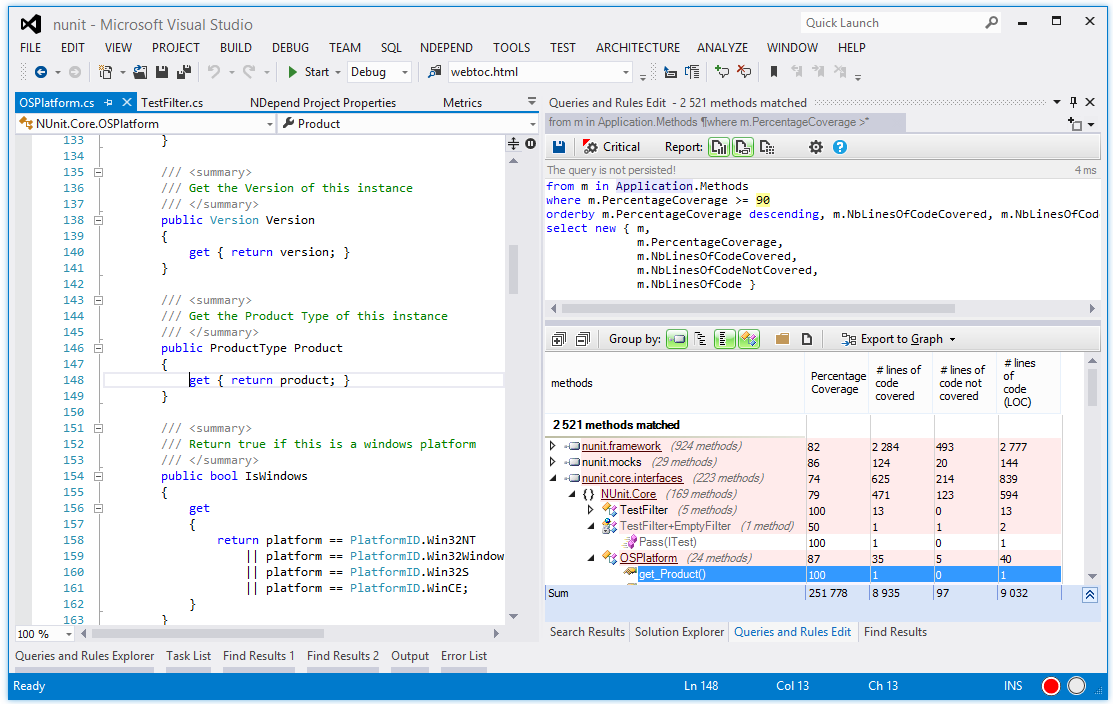
NDepend analyses your codebase and creates all kind of metrics and charts to assess the readability, maintainability and robustness of your code. You can either read the metrics as-is or create custom Linq-like queries to find the data of interest.

For architects, this tool seems to be very useful for monitoring how the codebase evolves. It might also be useful as a one-shot analysis in e.g. a due diligence process where the overall code quality in a project needs to be assessed.

I am more interested in the test-driven aspects of it though. NDepend can gather code coverage data and use them conjointly with the other NDepend metrics to get a picture on how well complex parts of the code are covered by tests.

Is this useful for a TDD developer? Personally, I am not using code analysis tools very often and find the amount of information a bit overwhelming. For architects or others that like to view their code from a more analytical point of view, however, NDepend is a gold mine of information.

Friday, May 15, 2015

Should we test private methods?

Should we test private methods?

One question which very often pops up when it comes to test-driven development is: "should we test private methods?" There are some (controversial) ways to test private methods in C#. For example, you can declare the test assembly a friend class of the testee assembly. That doesn't smell good though.

So should we test private methods?

This blog post will not try to answer that... because the question is wrong!

It's a sign

If you have read my previous blog post Help, my class is turning into an untestable monster, you may recall that untestable code is a sign of a poor design. It's time to do some refactoring.


Testing private methods is a related topic; if you feel the need to test private methods in order to test the behavior of a class, then it's a sign that you should do some refactoring. Your class is probably trying to do too much. It is violating the Single responsibility principle.

Example

Let's have a look on an example. Consider a class Logger which updates a log in a database when certain events occur. The Logger class has a method LogEvent(event) which generates a message with a timestamp based on the event and adds it to the database. It might look like this:


public class Logger
{
  public void LogEvent(AppEvent event)
  {
    string message = CreateMessage(event);
    AddMessageToDatabase(message);
  }

  private string CreateMessage(AppEvent event)
  {
    string message = "";

    foreach (var something in event.AffectedObjects()
    {
      ...do stuff here, add to string etc etc
    }

    ...add nicely formatted timestamp here

    return message;
  }

  private void AddMessageToDatabase(string message)
  {
    ...do all kinds of database magic here, add to correct table, avoid duplicates, etc
  }
}

Although a fairly trivial example, the Logger.LogEvent() method is trying to do two things: create a nicely formatted message AND add it to the database. Both of those tasks can have a number of different scenarios and failure conditions, so surely we feel the urge to test both the private CreateMessage() and AddMessageToDatabase() methods!

Refactor!

Having realized that this is a sign, we decide to refactor it:


Code:
public class MessageGenerator
{
  public string CreateMessage(AppEvent event)
  {
    ...create nicely formatted string

    return message;
  }
}

public class DatabaseLogger
{
  public void AddMessageToDatabase(string message)
  {
    ...do all kinds of database magic here, add to correct table, avoid duplicates, etc
  }
}

Now we have two smaller classes with one single responsibility each. The CreateMessage and AddMessageToDatabase methods are public because they are a part of the public contract and expressed responsibility of these classes.

Did we answer the question about whether or not to test the private methods of the Logger class? No, because the question was wrong!

Wednesday, October 15, 2014

Doing it wrong

Test-driven development is great and all that... if you do it right. My blog posts so far have been focusing on how to do it right. However, it's important to be aware of the pitfalls so that they can be avoided.

Many teams that try to TDD fail at some point. What are the most common mistakes when trying to introduce test-driven development?

Not realizing the paradigm shift

Doing test-driven development is not just about "writing unit tests". It's a whole new way to do software development. Therefore, it's important that the team realizes that it takes some time to get up to speed on TDD.

This is like walking across a ravine from one hilltop to the next. Your team is probably well-established and has reached a productivity peak. In order to reach the next peak, you need to realize that your productivity will suffer for a limited period while you adapt to a new development paradigm:

Crossing the ravine
If the team, their manager or other stakeholders don't realize this, you/they may get impatient and decide to abandon the whole TDD idea. What a misery!

No buy-in from management

This goes hand in hand with the previous section. Switching to TDD is an investment. Like any other investment, it comes with a cost. The management needs to realize that there will be an initial cost in terms of training and temporarily reduced productivity while crossing the ravine.

The management also needs to realize that this is an investment that pays off. After the initial cost, the benefit is obvious: software with fewer bugs means higher quality, a shorter beta testing phase and happier customers. It's not always easy to quantify this benefit into a language that managers and shareholders understand (the $/£/€/kr language), though.

Developers decide up front that TDD is a bad idea

This is perhaps one of the toughest obstacles. If the developer team is reluctant to do TDD in the first place, it's hard to enforce it. As a team lead, one of the most important tasks will be to motivate the team to do TDD. A TDD introductory course is highly recommended, as it's hard to learn TDD on your own without any mentoring.

It's important that a critical mass within the team does proper TDD. If several developers completely ignore the fact that there are tests that need to be maintained, they will quickly ruin the entire TDD process for the others.

No focus on maintainability

I mentioned maintainability in my blog post "Pillars of unit tests". You should treat your test code as well as your production code. Your test code is not a second class citizen. Test code should be reviewed and refactored as often and as carefully as the production code.

If the test code turns into spaghetti, maintainability will suffer. As you add or change functionality in the production code, it will become harder and harder to do the required changes to the test code. The team may give up testing new use cases, tests will fail for the wrong reason and the team gives up doing TDD.

Too hard to run tests or tests are not trusted

It should be easy to run tests. Ideally, the team should use a test runner like NCrunch so that the developers don't need to run the tests manually.

If it's hard to run tests, or the tests run very slowly, developers tend to skip it. They may check in broken code into the source repository because they don't realize that the tests are failing. All hope is lost.

Also, it doesn't help to run the tests if you don't trust them. If the team does not have a good habit of rejecting code that causes tests to fail, the team will stop trusting the tests. If the tests are not trustworthy, much of the benefit with TDD is lost.

Thursday, August 7, 2014

Productivity tips: live templates in Visual Studio and ReSharper

In my blog post Two readability tips for naming and organizing tests, I shared some tips for arranging tests. The tests are typically named and organized like this:


[Test]
public void ItemUnderTest_Scenario_ExpectedBehaviour()
{
  // Arrange
  Arrange the test here...

  // Act
  Do the action which is being tested here...

  // Assert
  Do assertions here...
}

While the naming and arrangement scheme is simple enough, it quickly becomes boring to write this stub every time you write a new test. If you are fortunate enough to use Visual Studio with the ReSharper plug-in, however, there is a nice feature called "live templates" which can do it for you!

Live templates allow you to type a keyword, select one of the live template entries from the popup menu which automatically pops up, and ReSharper will automatically insert the template for you. In this case, the template for a test is named "test":


After the template is pasted into the test class, there is no need to navigate the cursor around in order to edit the details in the test name. Red rectangles represent the fields that you will typically want to edit (ItemUnderTest, Scenario and ExpectedBehaviour). Enter the contents of those fields, press enter after editing each field, and then you're ready to implement the test!

Create and edit the live templates in ReSharper->Templates Explorer. As you can see, there are already many useful built-in templates:


Notice how you define the fields that the user typically edit after inserting the template: $ItemUnderTest$, $Scenario$ and $ExpectedBehaviour$. After the user has entered the contents of those fields, the cursor is placed at the optional $END$ keyword.


Thursday, June 26, 2014

Help, my class is turning into an untestable monster!

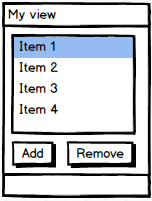
SO, let's say that you have a nicely designed and unit tested class. Perhaps it's a MVVM dialog model which takes care of commands and displaying stuff. In the beginning, this class has a single list of selectable objects, a button which adds a new object and a button which removes objects:


Testing this is simple, isn't it? Create a test which verifies that the list has the relevant objects. Write another test which adds a new object and a third test which removes the selected object. Life is easy!

Now your client is so happy with the dialog, he has some additional requests. He wants to add some complex filtering so that only objects that meet certain criteria are visible. He also wants the list to be shown in a hierarchical tree instead of a flat list. Of course he also wants to define how to group them. Oh, and, based on the user's privileges, the remove functionality may or may not be enabled:


Now we have thrown a lot more logic into the dialog. There are multiple cases which yield a growing number of permutations -- how can we make sure that we cover all of those scenarios in tests? The user may or may not filter, he may or may not group into categories, etc. Your class is starting to get hard to test. It's turning into an untestable monster.

You will see this in your code. You will see it a lot. Well, it's a sign!


It's a sign

Testable code which turns into untestable code usually means that the code has a more fundamental problem. As a class grows, it is getting more and more responsibilities. More responsibilities means more scenarios to cover, and more complexity. The class is starting to violate The Single Responsibility Principle.

Regardless of whether we do TDD or not, this is a bad thing. It's time to divide and conquer -- split your complex multi-responsibility class into smaller, simpler single-responsibility classes. Those classes will be easier to test, and you will avoid all the complex test scenario permutations.

Divide and conquer

In our view model example, the view model has at least these responsibilities:
  • Do filtering of items based on some criteria
  • Organize the items into a hierarchy based on user selection
  • Present the hierarchy as a tree view
  • Allow user to select items
  • Add and remove items
  • Disable features based on user privileges
Obviously, this class is violating the Single Responsibility Principle! Hence, the root of the problem is not the testability as such -- it's the class itself. The increasing complexity of the tests has revealed that the production code is a candidate for refactoring.

In this case, I would split the class up into a filter class, a hierarchy organizer class, user interaction handler, etc. This is a good idea anyway from a software quality perspective.

Conclusion

As classes grow with an increasing number of responsibilites, testing becomes harder. Don't get tempted to skip the tests. Instead, refactor the production code class so that it becomes testable AND well-designed.

TDD is not only a first line of defense against new defects. It's also a very efficient design tool which forces you to keep your classes tidy and adhere to the SOLID principles.

Poor testability is a sign. Embrace the sign. Refactor your code today!

Wednesday, June 11, 2014

Automated testing of rendering code

In my blog post "TDD and 3D visualization", I wrote about a somewhat complex scenario: how to do TDD on 3D visualization. That blog post focused on visualization using high-level toolkits like Open Inventor or VTK. In that case, we don't test the rendered result. Instead, we test that the state of the scene graph is correct, and we trust the 3D toolkit to do the rendering correctly for us.

What if we write the rendering code ourselves? This may be the case if we write our own ray tracer or GPU shaders. In that case, we actually need to verify that the rendered pixels are correct.

Bitmap-based reference tests

TDD-style test-first development is not easy to do in this case, and it may not even be possible. The test result itself is much more complex than a trivial number or string result. How can we write a test that validates a complex image without having the rendered image up front?

In this case, it may be more convenient to write the rendering code first and then use a rendered image as a reference image for the test. We will loose some of the benefits of doing proper TDD, but those tests will still act as regression tests that verify that future enhancements do not introduce defects.

The production code and tests will thus be written like this:

  1. Write production code that renders to a bitmap
  2. Verify the reference image manually
  3. Write a test that compares future rendering results with this reference image
  4. Fail the test if they differ

Allow for slight differences

This may sound fairly trivial, but reference image-based tests have one major challenge: the rendered images may differ slightly because of different graphics cards and different graphics card drivers:


For example, different drivers may apply shading differently so that the colors vary between driver versions. Furthermore, antialiasing may offset the image by one pixel in either direction, and the edges may be rendered differently. We certainly don't want the tests to fail because of this, because then we stop trusting the tests.

Hence, we need to allow for small differences between the rendering result and the reference image. More specifically, we need to allow for
  • Single pixel offset
  • Small differences in color or intensity
I have been using this approach with good success:
  1. Render image
  2. For each pixel in the rendered image, find the pixel in the 3x3 neighbouring pixels in the reference image with the lowest deviation in RGB pixel value. Add this deviation to a list.
  3. Create a histogram of all the pixel deviations so that you can calculate the distribution of the errors.
  4. Decide on an error threshold for acceptable differences. For example, say that
    • A maximum of 0.1% of the pixels can have a larger RGB deviation than 50
    • A maximum of 2% of the pixels can have a larger RGB deviation than 10
    • A maximum of 20% of the pixels can have a larger RGB deviation than 3
You should start with a fairly strict tolerance. If you find that you get too many false positives, increase the tolerance slightly.

By defining a deviation distribution tolerance like this, you will allow for small variations while still catching rendering defects that cause rendering errors.

Render to bitmap, not to screen

If possible, render to an offscreen buffer in the tests. This is more robust than rendering to a window and then doing a screenshot, because the tests will not be obstructed by other windows, screensavers, locked computer, etc. This might be a good idea architectural idea anyway, as it separates rendering from display.


Wednesday, May 28, 2014

Code coverage -- meaningless number or the Holy Grail?

Code coverage is a term which is often brought up when discussing TDD. Code coverage is the percentage of the lines of code that are executed by unit tests.


Many teams have a specific goal for the code coverage. For example, a typical goal is to have at least 80% code coverage. Others claim that code coverage is a meaningless number because you can have 100% code coverage with nonsense tests that have no value. So which coverage should one aim for?

Coverage is not a measure of quality

You can have 100% test coverage, and yet the tests may be worthless. A single test which simply executes every line in the production code without asserting on anything will yield a 100% coverage, but it won't detect any defects. Clearly, coverage can't be used to measure test quality. So what is it good for?

Coverage is an alarm bell

Although a 100% coverage does not provide much information, the opposite case does. If you have a test coverage of 20%, it means that almost none of the production code is tested. Sound the alarm and do something!

Hence, code coverage should be used as an indication that something is wrong and not as a measure of test quality. 

So which coverage should we aim for?

Personally, I rarely measure code coverage. If you do proper TDD (write test first and never touch production code before you have a failing test), your coverage will naturally be close to 100% because you already test for all the desired behavior. Some test runners decorate the source code as you type to indicate whether it's covered by tests, so untested code will be screaming at you.

If a team wants to run periodical code coverage analysis in order to enable the lack-of-tests alarm bell, I would aim for close to 100% on testable code and 0% on untestable code. Testable and untestable code should ideally be separated into different modules of the application, but that's another story which deserves a separate blog post at some point in the future...